
In order to ensure that each of the methods can be analysed with parity, the logical starting place would be setting up the common scene properties
Project Settings
The project is set to 2000 x 2000px (half the Photoshop resolution) which allows the camera to push considerably into the scene without loss of resolution.
Contextually a slow ambling camera movement suits this scene with a period at the end where the camera is static and the viewer can take in the various elements.
The ‘dope sheet’ view (Fig 1) shows the camera animation starting at frame 1 and running through to frame 200, after which the camera is static for a further 40 frames.
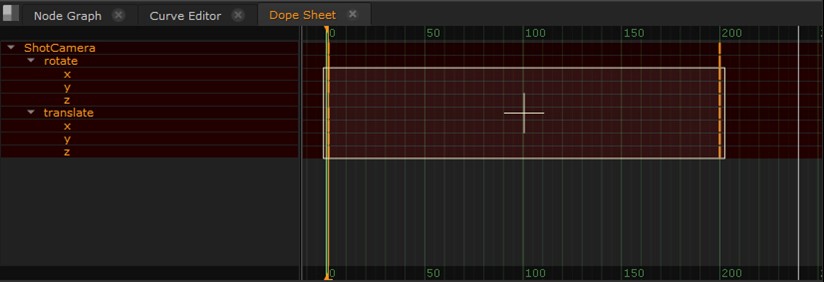 |
| Fig 1: Camera animation keyframes seen from the Dope Sheet |
To accommodate this, the sequence was set to a duration of 240 frames or 10-seconds, running at a standard frame rate of 24 frames per second (Fig 2).
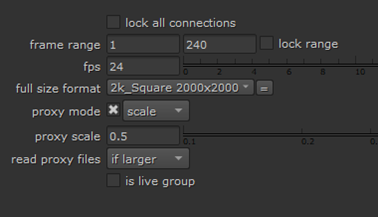 |
| Fig 2: Project Settings show setup of sequence duration, resolution and frame rate. |
Render Settings
A Write node is added and configured to QuickTime format with no compression, affording high quality renders of both single still frames and video.
This is connected to the Scanline renderer and used of all renders for the study (Fig 3).
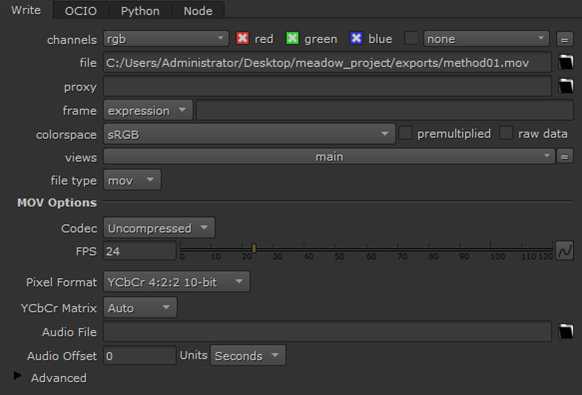 |
| Fig 3: Write Node with common render settings configured in advance. |
 Peter Holmes PhD Journal